Update on your My Health Funds account

We are updating the M-TIBA platform to improve how you manage your healthcare funds. As part of this update, the My Health Funds (MHF) savings wallet will be discontinued. This change only affects the MHF savings wallet. Your access to M-TIBA health insurance benefits stays the same.

Manage your insurance benefits anytime, anywhere.

How to withdraw from your My Health Funds account

You can withdraw your My Health Funds easily using USSD or have the money sent directly to your M-PESA.

Find the simple 3-guide process below. It’s simple. It’s secure. And you stay in control. If you need help at any point, our customer care team is ready to support you every step of the way.

Withdraw Your Funds

Learn how to withdraw your funds,
reset your pin if you have forgotten.

Step 1: Dial *253*2#

1. Dial *253*2# on your mobile phone.

This is a free service, no airtime required.


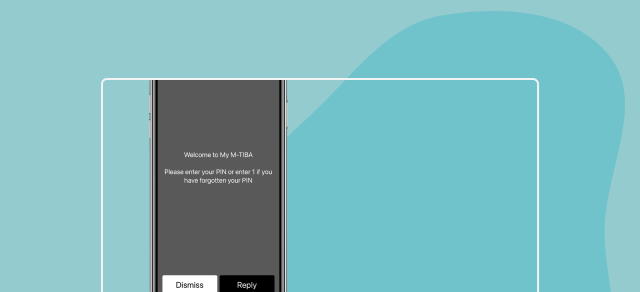
Step 2: Sign In to Your Account

Enter your 4-digit PIN. If you forgot your pin :
1.Select the option 1 for "Forgot PIN" or "Reset PIN"
2. Enter your ID Number or Date of Birth (DDMMYYYY) as prompted to verify your identity
3. Create a new 4-digit PIN and confirm it
4. You can now sign in to your account using your new PIN.

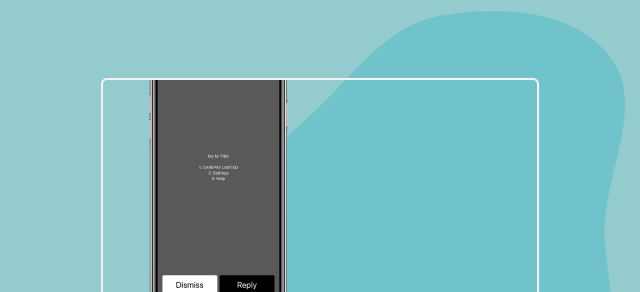
Step 3: Select "Withdraw Funds"

Navigate to your wallet or account and choose to withdraw your MHF balance to M-PESA.
You will receive an SMS confirmation once the transfer to M-PESA is successful.


SUPPORT

Frequently asked questions

Navigate M-TIBA with confidence.
How do I withdraw my funds?
If you have an active MHF balance, you can withdraw it yourself in seconds:
1. Dial 253# on your phone. This is a free service. No airtime is required.
2: Sign In - Enter your 4-digit PIN. If you forgot your PIN, input 1 and follow the reset steps
3. Select "Withdraw Funds" - Navigate to your wallet or account and choose to withdraw your MHF balance to M-PESA.
4: Confirm

You will receive an SMS confirmation once the transfer to M-PESA is successful.
I forgot my PIN. How can I reset it?
Resetting your PIN is easy and can be done instantly via USSD through:
1. Dial 253*2# on your mobile phone
2. Select the option 1 for "Forgot PIN" or "Reset PIN"
3. Enter your ID Number or Date of Birth (DDMMYYYY) as prompted to verify your identity.
4. Create a new 4-digit PIN and confirm it.

You can now sign in to your account using your new PIN.
I changed my phone number. How do I update it?
To ensure your refund reaches you, your number must be validated by our team to be updated.

Action Required: Please contact us directly through toll free line (0800721253)to update your registered number securely. This protects your account and your funds.
Why is the My Health Funds (MHF) program being discontinued?
M-TIBA has some exciting updates on how we’re evolving to better serve you and millions of others.
Since we launched the M-TIBA wallet, we’ve helped many people save and access healthcare, and thanks to your trust, we’re growing into something even bigger and better.
That’s why we aim to focus on improving health insurance management to ensure more people get access to more affordable healthcare and a better experience.
What will happen to the funds in my M-TIBA wallet?
Your funds are safe. You can withdraw your remaining balance at any time before March 8 2026. Incase you do not withdraw the funds yourself we will do a validation on your details and initiate a refund to your registered M-PESA number.
Is there a deadline to withdraw my funds?
We encourage you to withdraw your funds by March 8 2026.
Will there be any charges for withdrawing my funds?
No, withdrawing your funds will be free of charge. We want to ensure you receive your full balance without any deductions.
Are there alternative programs I can join for my healthcare savings and needs?
Yes, M-TIBA manages health insurance solutions, products and services on behalf of our insurance partners. We can recommend one of our partner brokers to advise and recommend a cover that suits you and your family.
Who can I contact if I have more questions or need assistance?
Our customer support team is here to help you. You can reach us by calling 0800 721 253 or emailing customercare@mtiba.co.ke
What happens if I do not withdraw my funds before the deadline?
If you do not withdraw your funds before the deadline, we will do a validation of your details and  initiate a refund to your registered and validated mobile number.
If we are unable to validate your details, the funds will be transferred to the Unclaimed Financial Assets Authority (UFAA) in accordance with regulations. Call 0800 721 253 or email customercare@mtiba.co.kefor assistance.
Will my personal information remain secure after the program ends?
Yes. We are committed to protecting your personal data and will continue to uphold the highest standards of data security and privacy.

As guided by our privacy policy, all your personal data will be deleted from our database when the My Health Funds (MHF) accounts are closed.
I have an ongoing treatment plan funded by MHF. What should I do?
Call 0800 721 253 or email customercare@mtiba.co.ke as soon as possible. We will work with you and your healthcare provider to ensure a smooth transition and discuss alternative arrangements.
What happens if I changed my phone number?
Refunds are processed to the last registered and validated mobile number on your MHF account.
If your number has changed, call 0800 721 253 or email customercare@mtiba.co.ke for guidance.
How can I access my next of kins M-TIBA wallet?
Call 0800 721 253 or email customercare@mtiba.co.ke for guidance on the required documentation and process.
How will I know if a refund to my account was successful?
You will receive an SMS confirmation from M-PESA once the refund has been processed. If you do not see the funds in your M-PESA account, please contact our customer support team by calling 0800 721 253 or emailing customercare@mtiba.co.ke.
What happens if the refund to my M-PESA fails?
If we are unable to successfully refund your funds due to incorrect or unverified details, we will attempt validation. If validation is not possible, the funds will be transferred to the Unclaimed Financial Assets Authority (UFAA) for safekeeping in accordance with regulatory requirements. You may then claim your funds directly from UFAA.
What is the Unclaimed Financial Assets Authority (UFAA)??
The Unclaimed Financial Assets Authority (UFAA) is a government body responsible for holding unclaimed funds securely until the rightful owner claims them. Your funds remain safe and protected.
Why were my funds sent to UFAA?
If we were unable to validate your contact or identification details to safely process your refund, regulations require us to transfer the funds to UFAA for safekeeping. This ensures your funds remain protected until you claim them.
How can I claim my funds from UFAA incase they are submitted there?
To claim your funds from UFAA:
1. Visit the UFAA website: http://www.ufaa.go.ke
2.
Search for your name or ID number
3. Follow the claim instructions provided on the website
4. Submit the required identification documents.

If you need guidance before starting the process, contact us at 0800 721 253 or customercare@mtiba.co.ke, and we will assist you.
What documents will I need to claim from UFAA?
You will typically need:
1. A copy of your National ID or Passport
2. Proof that you are the rightful owner of the funds
3. Any supporting documents requested by UFAA

The exact requirements are provided on the UFAA website.
How long does it take to receive funds from UFAA?
Processing timelines are determined by UFAA. Once your claim is verified and approved by them, payment will be made directly to you. For status updates, you may contact UFAA directly through their official website.
Can M-TIBA refund my funds after it has been sent to UFAA?
Once funds have been transferred to UFAA in accordance with regulations, they can only be claimed directly through UFAA. Our team can guide you on the process, but we cannot retrieve the funds on your behalf.
I changed my phone number. Could this have affected my refund?
Yes, refunds are processed to the last registered and validated mobile number on your MHF account. If your number changed and we were unable to validate your new details, the funds may have been transferred to UFAA. Please contact us at 0800 721253.
How can I contact support for a specific question regarding My Health Funds?
If you need help related to My Health Funds withdrawals reach M-TIBA Customer Care through either:
1. Toll-free: 0800 721 253
2. Email: customercare@mtiba.co.ke
Get support

Can't find an answer to your question?

Get in touch with our team today